Testnet: Monad Testnet, test USDC only, unaudited
Open app

Split the bill with friends. Pay restaurants privately.

FairPay splits any bill and tracks who has paid, checking every payment on Monad. At FairEats restaurants, guests order from the table, split the bill and can pay without linking their wallet.

The app runs on a free server, so the first visit can take about 50 seconds to wake it up.

  • No account or email. You sign in with a wallet signature. It costs nothing and sends no transaction.

  • Checked on-chain. A share counts as paid only once FairPay finds the payment on Monad. Public payments link to their transaction on the explorer.

  • Testnet and unaudited. Test USDC only, with no value. Never send real funds to a FairPay wallet or contract.

  • Independent project. Built on Monad, not made or endorsed by the Monad Foundation. About FairPay

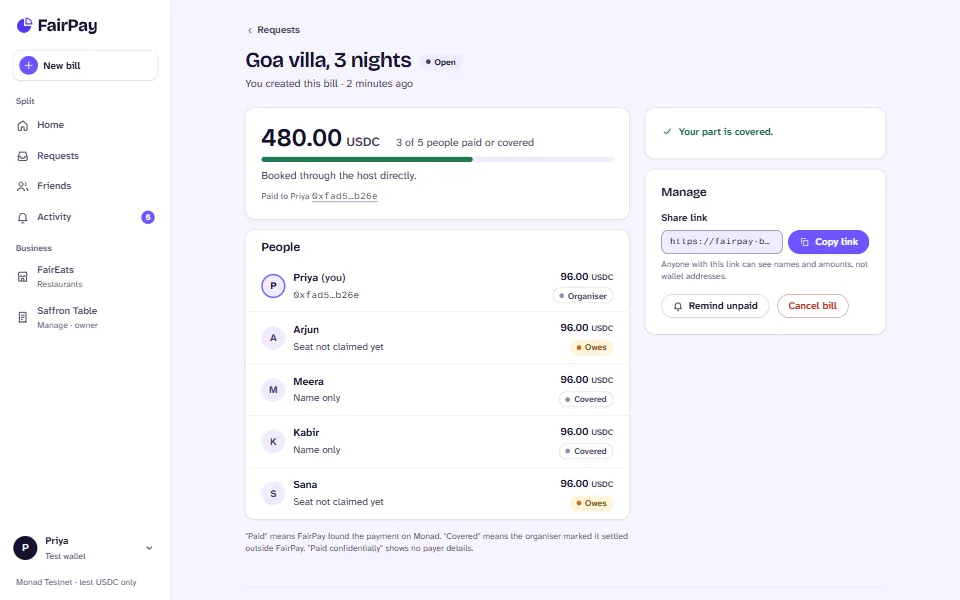
The FairPay app on a desktop: a bill called Goa villa, 3 nights, for 480 USDC. Three of five people have paid or are covered. The people list shows Priya as organiser, Meera and Kabir as covered, and Arjun and Sana still owing 96 USDC each. A side panel has the share link with a Copy link button, Remind unpaid and Cancel bill.
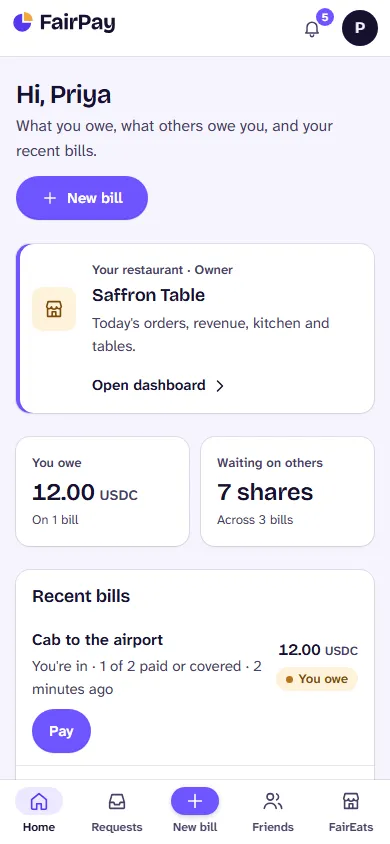
The FairPay app on a phone: Hi, Priya. You owe 12 USDC on one bill, and seven shares are waiting on others across three bills. Recent bills list Cab to the airport with a Pay button, then Concert tickets with Remind and Cancel.
  • Split it your way

    Evenly, by exact amounts, by percent or by shares. Leftover cents land in a stated, predictable place.

  • One link per bill

    Send it to the group. Friends without a wallet get a name-only seat and claim it when they sign in.

  • Paid means verified

    A share shows as paid only after FairPay finds the payment on Monad. Nobody can just tick a box.

  • Private at restaurants

    At verified businesses you can pay through a privacy pool, so your wallet isn't linked to the payment.

Split any bill with friends

A trip, a dinner, the rent. Create a bill, send one link, and watch the shares come in.

  1. Create the bill.

    Enter what it was for and the total in USDC, then add people from your friends, by wallet address or by name. The preview shows every share before you save.

  2. Share one link.

    Copy the bill's link into your group chat. It shows names and amounts, never wallet addresses. Anyone added by name claims their seat from the link.

  3. Everyone pays their part.

    Each person pays their own share from their own wallet, in test USDC on Monad. Send a reminder to whoever hasn't paid yet.

  4. The bill settles itself.

    Each share turns Paid once FairPay finds the payment on-chain. Mark anyone who paid you some other way as Covered. When nothing is left to collect, the bill is settled.

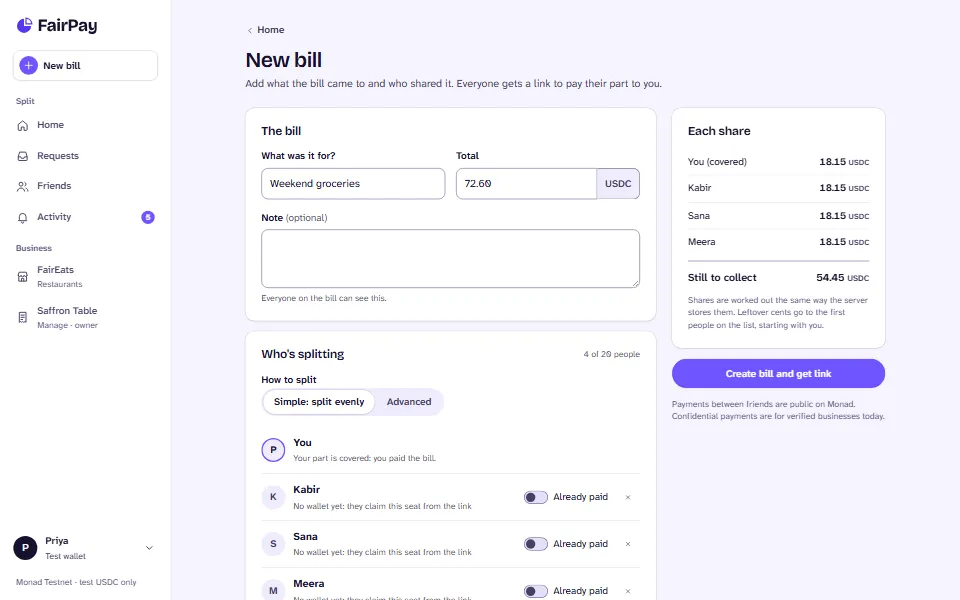
The New bill form: Weekend groceries, 72.60 USDC, split evenly. Kabir, Sana and Meera are added by name with Already paid switches. The Each share panel shows 18.15 USDC per person and 54.45 USDC still to collect, above a Create bill and get link button.
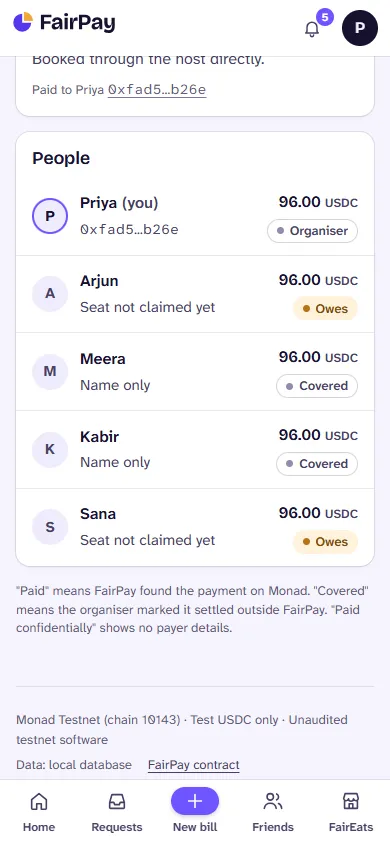
A bill on a phone: the people list with Priya as organiser, Arjun and Sana with seats not claimed yet and owing 96 USDC, and Meera and Kabir covered.

Four ways to split

Evenly
Everyone owes the same.
Exact amounts
Type each person's part; it must add up.
Percent
For uneven shares of a big bill.
Shares
Two shares for the couple, one for each friend.

One person paid? At a restaurant, one guest can pay the whole bill and then split it with friends from the order page. The others settle up with them through FairPay.

FairEats: order at the table, split, pay

FairEats is the restaurant platform inside FairPay, under Business. Restaurants list their menu and tables; guests order from their phones and each pays their own share.

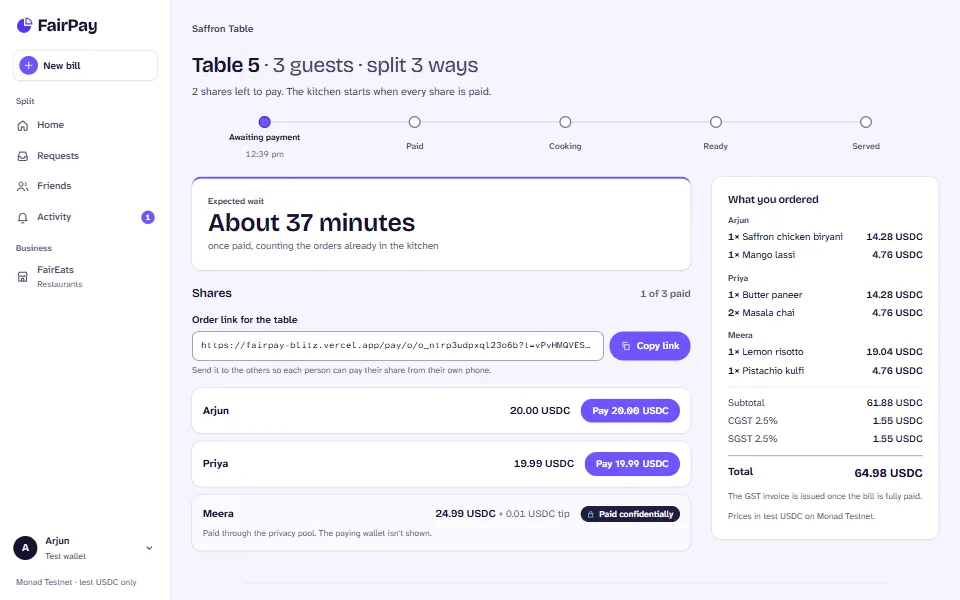
A FairEats order at Saffron Table: Table 5, three guests, split three ways, awaiting payment. An order link for the table with Copy link, then three shares, Arjun 20 USDC, Priya 19.99 USDC and Meera 24.99 USDC, each with its own Pay button. On the right, what each guest ordered with CGST and SGST and a 64.98 USDC total.
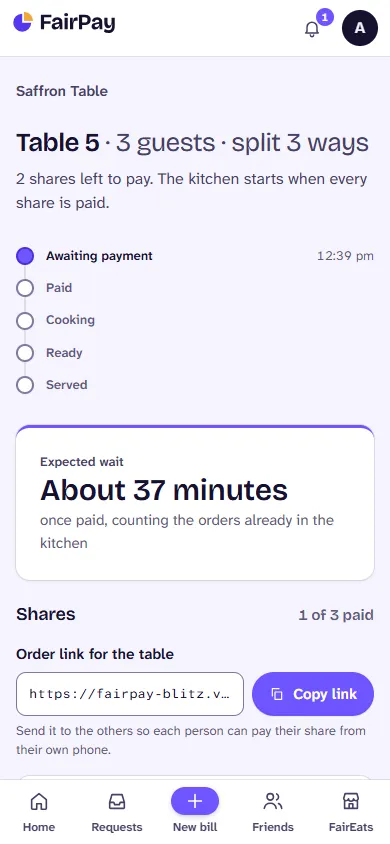
A FairEats order on a phone: Table 5, three guests, split three ways. Three shares left to pay; the kitchen starts when every share is paid. A status timeline from awaiting payment to served, and an expected wait of about 37 minutes.

For guests

  1. Open the restaurant's page from a table card or link, and pick a free table.
  2. Add dishes for each guest at the table. GST and any service charge are shown before you order.
  3. Choose how to pay: one person pays the whole bill, or everyone pays their own share.
  4. Pay publicly, or privately if the restaurant is verified for private payments.
  5. Follow the order from paid to cooking, ready and served, then open the invoice.
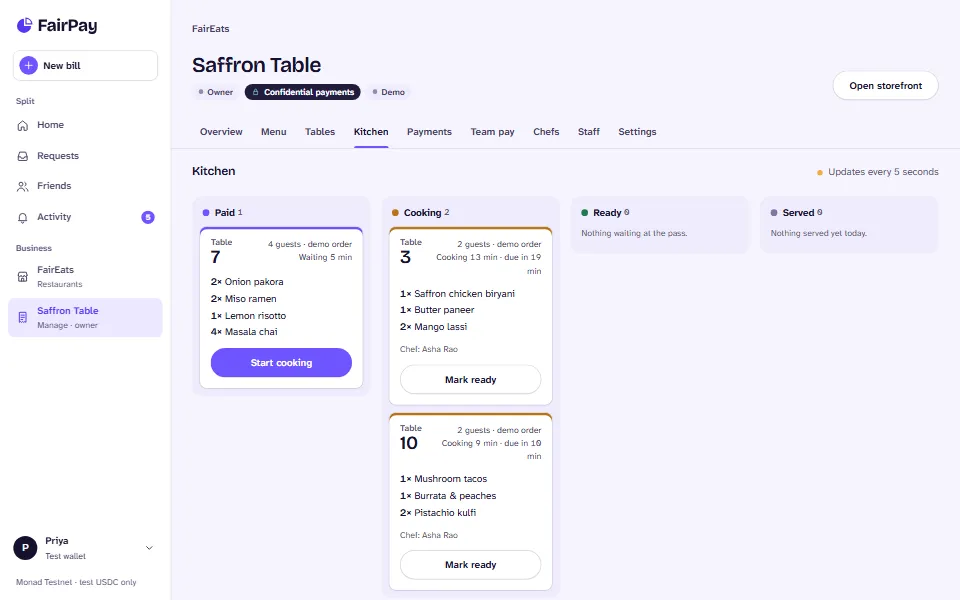
The restaurant dashboard for Saffron Table on the Kitchen tab: columns Paid, Cooking, Ready and Served. Table 7 waits with a Start cooking button; tables 3 and 10 are cooking with Mark ready buttons and chef Asha Rao.
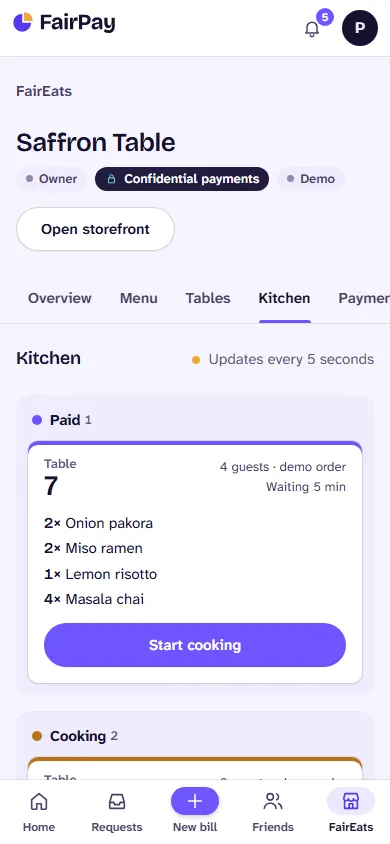
The Saffron Table dashboard on a phone, Kitchen tab: the Paid column holds table 7, four guests, with Onion pakora, Miso ramen, Lemon risotto and Masala chai and a Start cooking button.

For restaurants

  1. Register in a few minutes: name, address, state, and an optional GSTIN that is checked before it is saved.
  2. Build the menu with photos, categories, veg and spice marks, prep time and availability.
  3. Set up tables and seats, and see at a glance which ones are free.
  4. Run the kitchen board: start cooking, mark ready, mark served. It updates every 5 seconds.
  5. Add chefs with profiles and staff by wallet and role. Payouts go to the owner's own wallet.

GST invoices, ready to share

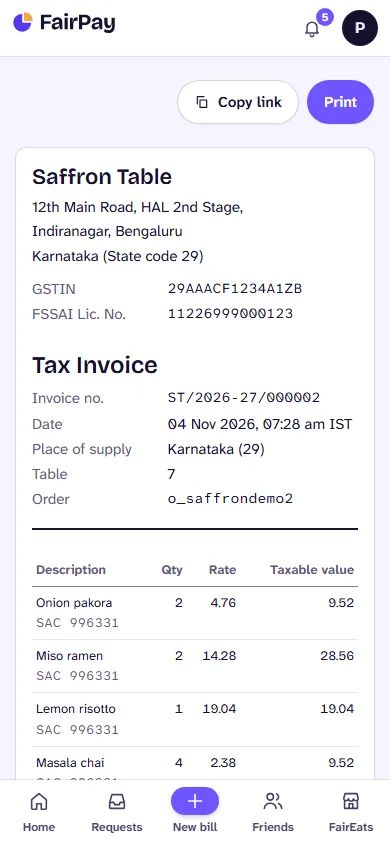
When a bill is fully paid, FairEats numbers and issues the invoice. With a GSTIN it is a Tax Invoice with CGST and SGST (or IGST), place of supply, SAC codes and the amount in words; without one it is a Bill of Supply. Each invoice has its own link and prints cleanly.

Amounts are in test USDC. Saffron Table is a demo restaurant with a demo GSTIN.

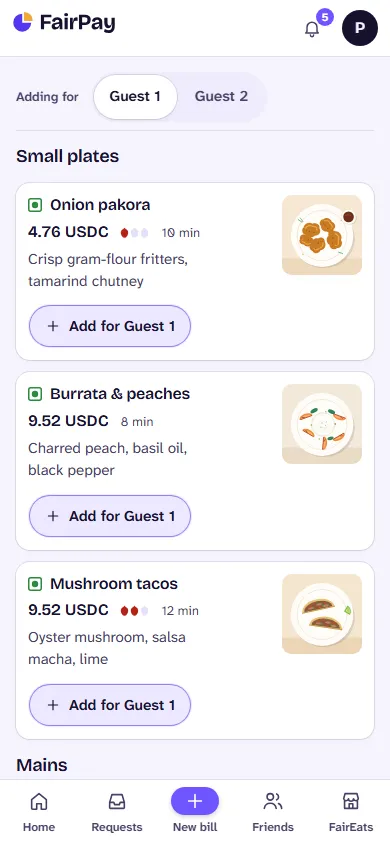
The Saffron Table storefront on a phone: the guest switch reads Adding for Guest 1, above an Onion pakora card with a photo, 4.76 USDC, a veg mark, spice level, 10 minutes and an Add for Guest 1 button.
A GST tax invoice on a phone: Saffron Table, Indiranagar, Bengaluru, Karnataka, state code 29, with GSTIN and FSSAI numbers, invoice number ST/2026-27/000002, place of supply Karnataka, table 7, and the items with SAC codes, quantities and rates.

Private payments, explained simply

Private (the app calls it Confidential) doesn't mean invisible. It means the chain can't connect your wallet to this payment.

It works when you pay a verified business, such as a FairEats restaurant whose payout wallet is on the pool's allowlist. Bills between friends are paid publicly.

  1. Your wallet

    Adds 5 USDC notes to the pool. This step is public.

  2. Privacy pool

    Holds your notes among everyone else's.

  3. Your browser

    Builds a zero-knowledge proof that you own a note.

  4. Relayer

    Sends the payment and pays the gas. It can refuse, but it can't redirect it.

  5. Restaurant

    Gets paid. FairPay verifies the payment on-chain, like any other.

What a public and a private payment record on-chain
What is recordedPublic payment Private payment
Your wallet addressIn the paymentOnly in the earlier top-up, not in the payment
The amountVisibleVisible (always whole 5 USDC notes)
The restaurant's addressVisibleVisible
What you orderedA reference code onlyA reference code only
Which top-up paidNot applicableHidden among the other deposits in the pool

Privacy here is from the public chain. FairPay's server still sees your connection (for example your IP address), and a small pool means a small crowd to hide in. Add notes well before you pay.

Verified on Monad Testnet

Real payments with test USDC, made with the contracts below. Open any of them on the explorer and check who sent it.

Every private payment comes from the relayer, so the chain shows the relayer, never the guest's wallet.
PaymentTransactionSent bySent to
PublicA share of a bill, paid from the guest's own wallet0xa96621a0e8ba54c5d1b16c5a709112acde78b55cb4762f7be8c0f2b7d7eaccaa (transaction on the Monad explorer, opens in a new tab)Guest wallet 0x1384675b3b293f3a71bf121525874b983c34c4b7 (Guest wallet on the Monad explorer, opens in a new tab)FairPay router
PrivateA FairEats order at Saffron Table, paid confidentially with one 5 USDC note0x867c10b854aaf3bd21cd2a4bf3098e0690cd120972719ab864c249d8e7d6d4d1 (transaction on the Monad explorer, opens in a new tab)Restaurant relayer 0x6f1ef92e0d6eb2428558781b5d87cfee19164266 (Restaurant relayer on the Monad explorer, opens in a new tab)Privacy pool

Contracts on chain 10143

Unaudited testnet software with test USDC. Don't use it with real money.

What to know before you try it

Testnet only.
Everything runs on Monad Testnet with test USDC that anyone can mint. Nothing here has value.
Not audited.
No independent audit of the contracts, the SDK or the app.
Not invisible.
FairPay's server sees connection details such as your IP address. Adding notes right before you pay can link the two by timing.
Private only at verified businesses.
The pool pays only allowlisted payout wallets, so bills between friends are paid publicly.
Fixed note size.
Private payments use 5 USDC notes with no change. If a share isn't a whole number of notes, the last note's extra goes to the restaurant as a tip, and the app says so first.
A sleepy free server.
The app runs on a free plan. After a quiet spell, the first visit takes about 50 seconds while it wakes up.
Build it into your own checkout

@fairpay/sdk does the payment and the check. Your backend creates a reference, the browser pays, and your backend verifies against the chain before it releases anything.

  • Public and private payments emit the same event, so you verify both the same way.
  • Approvals are for the exact amount, never unlimited.
  • The relayer can refuse to send a payment, but it cannot redirect one.
Backend · TypeScript
const result = await fairpay.verifyPaymentTx(
  deployment,
  publicClient,
  {
    txHash, orderRef, merchant,
    amount: share.amount,
    expectedPayer: share.wallet, // public payments only
    minConfirmations: 2n,
  },
)
if (result.status === "verified") releaseOrder(shareId)

Split your next bill on FairPay.

Sign in with a browser wallet or the built-in test wallet, get test USDC from the faucet, and create a bill. It's free, and nothing on testnet has value.